
Best MT4/MT5 Trade Copier in 2026: Why Traders Are Switching to Local Copying
Most trade copiers route your orders through the cloud — adding seconds of delay and monthly fees.
If you manage more than one trading account — a personal account plus a funded account, several prop-firm challenges, or client accounts — you already know the problem: you cannot manually repeat every trade fast enough. A trade copier does it for you. The real question in 2026 is which kind of trade copier you should trust with real money.
The two kinds of trade copiers (and why it matters)
Every MT4/MT5 trade copier on the market falls into one of two architectures:
- Cloud copiers — your master account sends trades to the company's server, which forwards them to your other accounts. Every trade makes a round-trip across the internet.
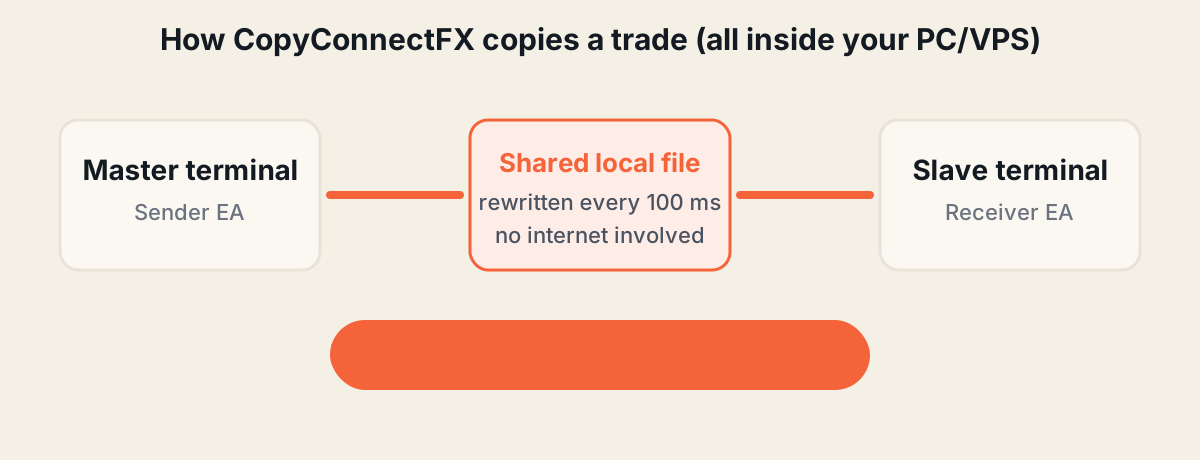
- Local copiers — trades copy directly between MetaTrader terminals running on the same Windows PC or VPS. Nothing leaves your machine.
CopyConnectFX is a local copier — and that single design decision is where almost every advantage below comes from.
CopyConnectFX vs typical cloud copiers
| Factor | CopyConnectFX (local) | Typical cloud copier |
|---|---|---|
| Copy speed | Under 10 ms | 1–5 seconds (network round-trip) |
| Internet outage | Copying continues at full speed | Copying stops completely |
| Account credentials | Never leave your machine | Stored on third-party servers |
| Price | Free | $15–40 per month |
| Directions | MT4→MT4, MT4→MT5, MT5→MT4, MT5→MT5 | Often limited or priced per pair |
| Monitoring | Realtime web dashboard, free for one machine | Varies, often none |
| Equity protection | Built-in (prop-firm safe) | Rarely included |
What makes CopyConnectFX more advanced
1. Millisecond execution where it counts
Slippage is the silent tax on copied trades. On a fast-moving pair like XAUUSD, a 2-second cloud delay can easily cost 20–50 points per trade. Because CopyConnectFX copies terminal-to-terminal on the same machine, the typical delay is under 10 milliseconds — and the dashboard shows you the exact delay of every single copy.
2. Copying that survives everything
The copier keeps working even if your internet dies, our servers go down, or the website disappears. Trade execution never depends on anything outside your machine. The web dashboard is monitoring only — it physically cannot place or block a trade.
3. Self-healing sync, not fragile signals
Most copiers stream "events" — and a single missed event leaves accounts out of sync. CopyConnectFX continuously reconciles master and slave state every 100 ms. Restart a terminal mid-trade, and it picks up exactly where it left off: opens what's missing, closes what's gone, syncs every SL/TP change, and handles partial closes proportionally.
4. A dashboard cloud copiers can't match
Every machine, account, balance, open trade, copy delay and error — live in your browser, from any device. Health scores tell you at a glance if a VPS is struggling, and alerts fire the moment a terminal goes offline or AutoTrading gets switched off.
5. Risk tools built for 2026 trading
Six lot-sizing modes (same, fixed, multiplier, balance ratio, equity ratio, risk-%), reverse copying, buy/sell filters, symbol mapping for cross-broker setups, and a prop-firm grade equity protection system that closes everything and pauses copying before a daily-loss breach can happen.
We also publish the risk maths as free tools you can use without an account: a lot size calculator, a prop firm drawdown calculator and an MT4/MT5 statement analyzer.
Where a cloud copier still makes sense
Honesty matters: if your accounts must run on different machines in different locations, a local copier can't bridge them — that's the one job cloud copiers exist for. But if your terminals can run on one PC or one $6/month VPS (which covers the vast majority of traders), local copying wins on every metric that matters.
Getting started takes about 10 minutes
- Create a free account (Google sign-in or email).
- Download the Sender and Receiver EAs from your dashboard.
- Follow the baby-step Get Started guide — every click is explained.
No license keys. No credit card. Copying is unlimited on the free plan. If you can copy-paste, you can run it.
Frequently asked questions
What is the best free trade copier for MT4 and MT5?+
CopyConnectFX is a free local trade copier that supports all four directions (MT4→MT4, MT4→MT5, MT5→MT4, MT5→MT5), copies in under 10 milliseconds, and includes a realtime web dashboard, equity protection and Telegram alerts, with no licence keys. Copying itself is unlimited on the free plan.
Is a local trade copier better than a cloud copier?+
For terminals running on the same PC or VPS, yes. Local copying executes in milliseconds, keeps working if your internet drops, and never sends your account credentials to third-party servers. Cloud copiers add network round-trips of 1–5 seconds and stop completely during outages.
Does CopyConnectFX work with any broker?+
Yes. It works with any MT4 or MT5 broker, including cross-broker setups. If symbol names differ (XAUUSD vs GOLD), a one-line symbol mapping handles it.
Do I need programming skills to set up a trade copier?+
No. CopyConnectFX is set up by dragging two files onto charts and pasting one pairing code. The step-by-step guide assumes zero technical knowledge and takes about 10 minutes.
Keep reading
Copy trades between MT4 & MT5 in milliseconds
Free local trade copier with a realtime web dashboard. Set up in 10 minutes — no coding.
Get Started Free